
Issue Resolution
Background
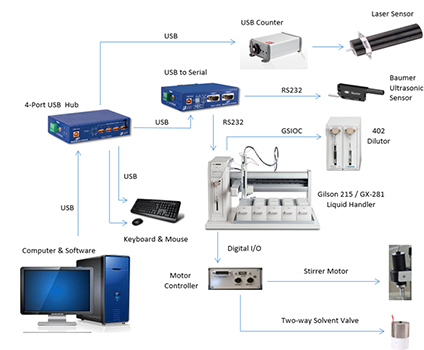
When starting the Automatic Particle Counting (APC) instrument the software produces the following error;
Cannot perform operation on a closed port.
This error occurs when the instrument cannot communicate with the Baumer level sensor and/or the Gilson Liquid Handler (XYZ table).
Resolution
Communication with the COM ports needs to be resolved. The trouble-shooting chart on page two of the service document provides guidance on determining the root of the COM port error. If the COM port issue cannot be sorted out on the computer and thru the instrument software, then this guide provides guidance on determining if the USB Hub is malfunctioning. If the USB Hub is at fault, then this guide provides an alternative mode of operating the instrument until the USB Hub can be repaired or replaced.
Service Media